CardTradeMate

CardTradeMate Browser Addon

Cardmarket and CardTradeMate in a single step.
The addon is installed
Nothing to set up. Open a Cardmarket order and the import button is waiting for you. Everything the addon does is listed below.
For Chrome and Firefox
The addon works on the Cardmarket pages you already have open: it pulls orders into CardTradeMate and makes those pages easier to read. Your data only ever goes to your own CardTradeMate installation — the API key stays local in your browser.
Setup

Connected in three steps

Set it up once — after that it runs alongside you.

Step 2 Create an API key
In your settings under "Add-on & API". The key is shown only once.
Step 3 Paste it into the addon
Open the addon settings, paste the key, save. Done.
The addon needs an API key — every account can create one, Free included. Showing your purchase prices on Cardmarket and listing cards with your own price rules are part of Premium.
Selling

Every article in a shipment

The cards themselves instead of rows of text — with price, set, condition and the order they belong to.
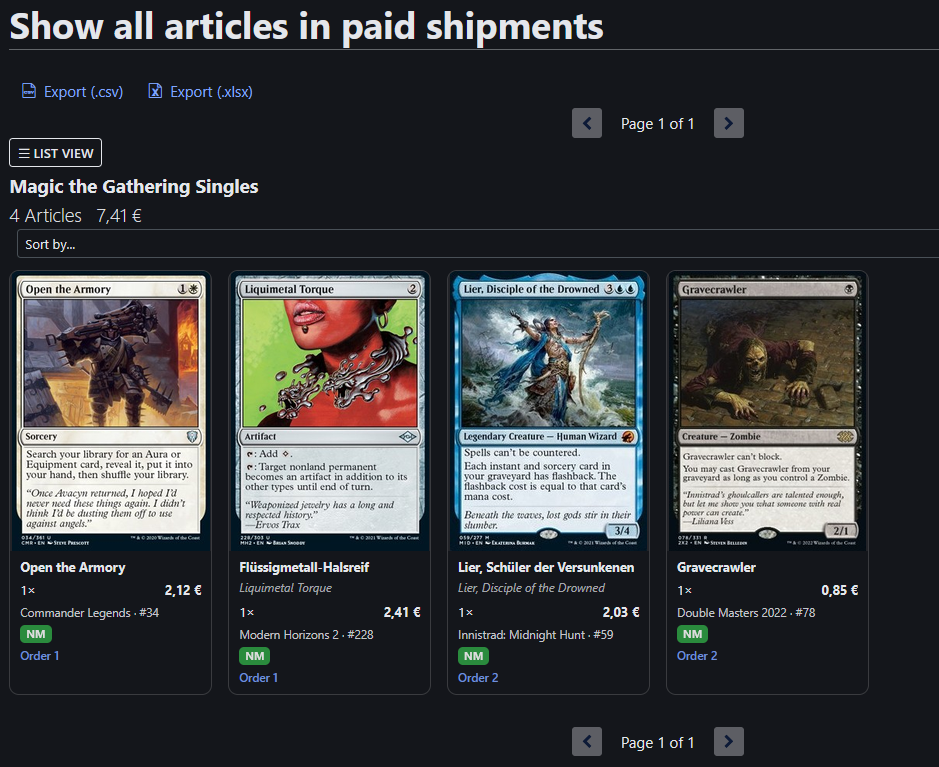
Article list as an image grid
Buying

Check off what arrived

Card by card, with a counter and sorting — a missing position stands out immediately.
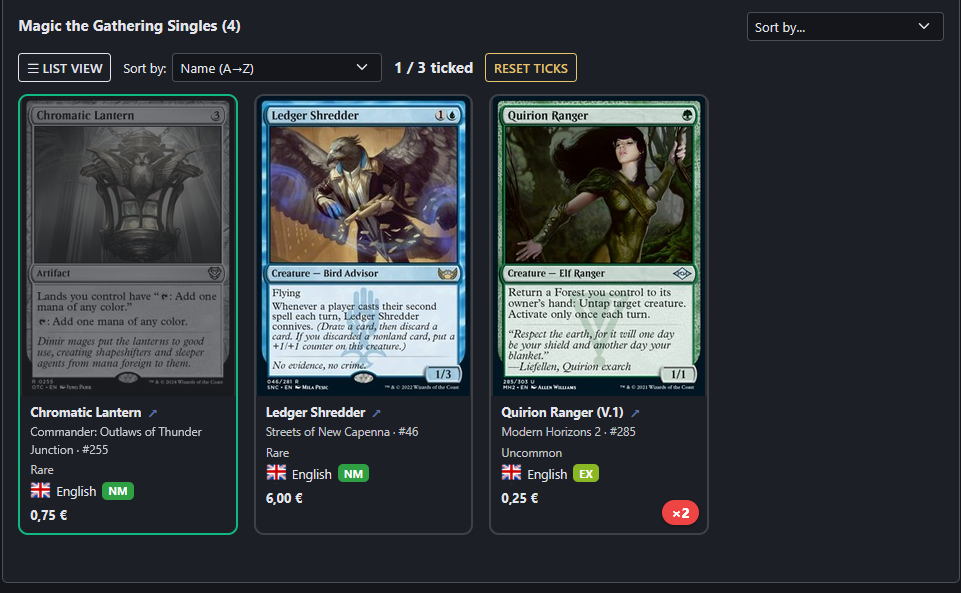
Order with cards ticked off
Selling

List cards & update prices Premium

Your price rules on Cardmarket's own pages: the price is calculated where the offers are, you only confirm it.
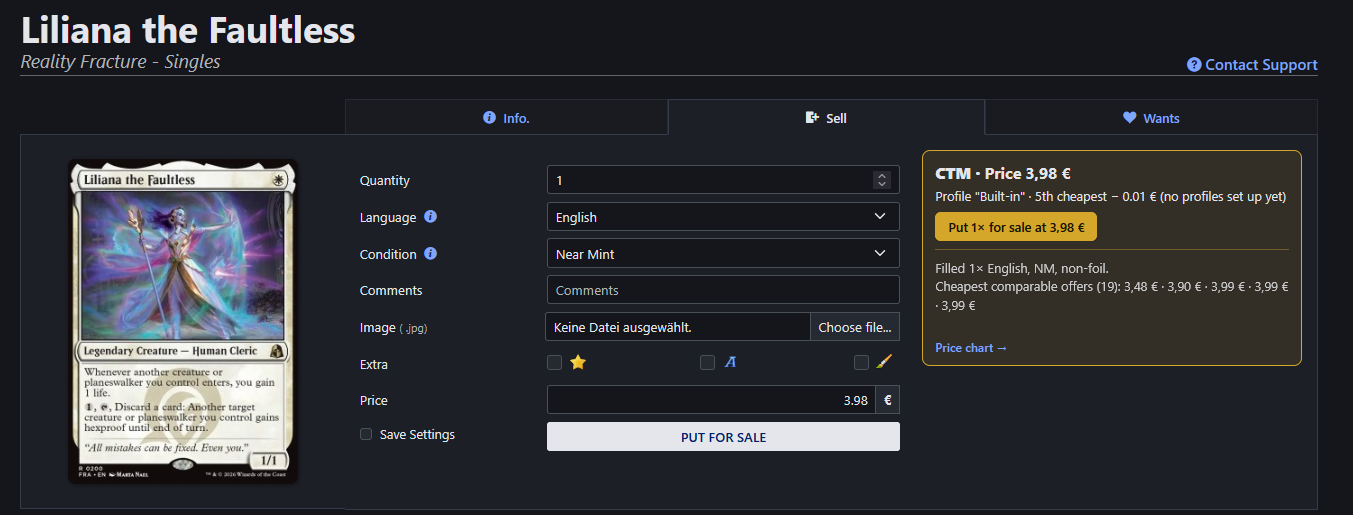

Cardmarket sell form filled in by the addon with the calculated price
List from an order – quantity, language, condition and price filled in; one click puts it for sale.
Price check of a listed article with a button to set the rule price
Update the price – on a card you already sell, the addon compares your price with your rule.
Order details · purchase and sales lists

Import orders

One click puts an order into CardTradeMate — with everything Cardmarket otherwise spreads across several pages.

Shipping, sales commission and trustee fee are carried over and allocated across the positions
Refunds included, along with which card they applied to
The order lists mark which orders have already been imported
Re-importing never overwrites corrections you made in CardTradeMate
After the import a link takes you straight to the order
Product pages · from your orders

List cards & update prices Premium

Put a card up for sale straight from its purchase in CardTradeMate — the addon fills in Cardmarket's sell form and calculates the price with your own rules. On every card you already sell it checks your price and updates it with one click.

"Sell on Cardmarket" in an order opens the product with quantity, language, condition and foil filled in
Price from your profiles: n-th cheapest offer or a price guide value, plus or minus a margin
Minimum prices per card type – or never below your purchase price plus a percentage for the commission
Already selling that card? Top up the existing article and set one price for all copies
Price check on every product page: listed vs. rule price, "Why?" explains it, one click updates it
Prices you set or see are reported back – Reports → Listed Prices
Sales pages

Your own buy price Premium

Every sold position shows what you paid for that card yourself — so you know your margin before you even open CardTradeMate.

Buy price and purchase date right at the position
A link to the card in CardTradeMate, no searching
Sales pages only — on a purchase it would be the order itself
Cards without a recorded purchase are marked as such
Article list of an order

Image grid instead of a table

Cardmarket lists articles as rows of text. The addon shows them as cards with the artwork on top and name, price, set, condition and order underneath.

You recognise a card by its artwork faster than by its name — especially across reprints
Switch back to the original list at any time; your choice is remembered
Works the same on purchase and sales pages
Order details

Check off what arrived

While unpacking a shipment you tick off each card in the grid. A counter shows how far you are, so you can see what is still missing.

Ten sort orders: name, price, quantity, rarity, set, foil first
"Open first" moves everything not yet ticked to the top
The state survives a page reload and can be reset
If something is missing at the end, you know exactly what to raise with the seller
Account · transactions

Commission from the account statement

Cardmarket does not put the sales commission on the order — it lives in the account statement. The addon reads it there and sends it to CardTradeMate.

Recognises commissions including reversals; opposing amounts cancel out
Every row shows whether the amount has already been transferred
Without this step your profit is missing the one item that reduces it most
The addon only talks to Cardmarket and to your CardTradeMate address. There is no intermediate server, no analysis of your data and nothing passed on to third parties.